Monitor Margin Levels
Applies to: Risk Managers, Administrators
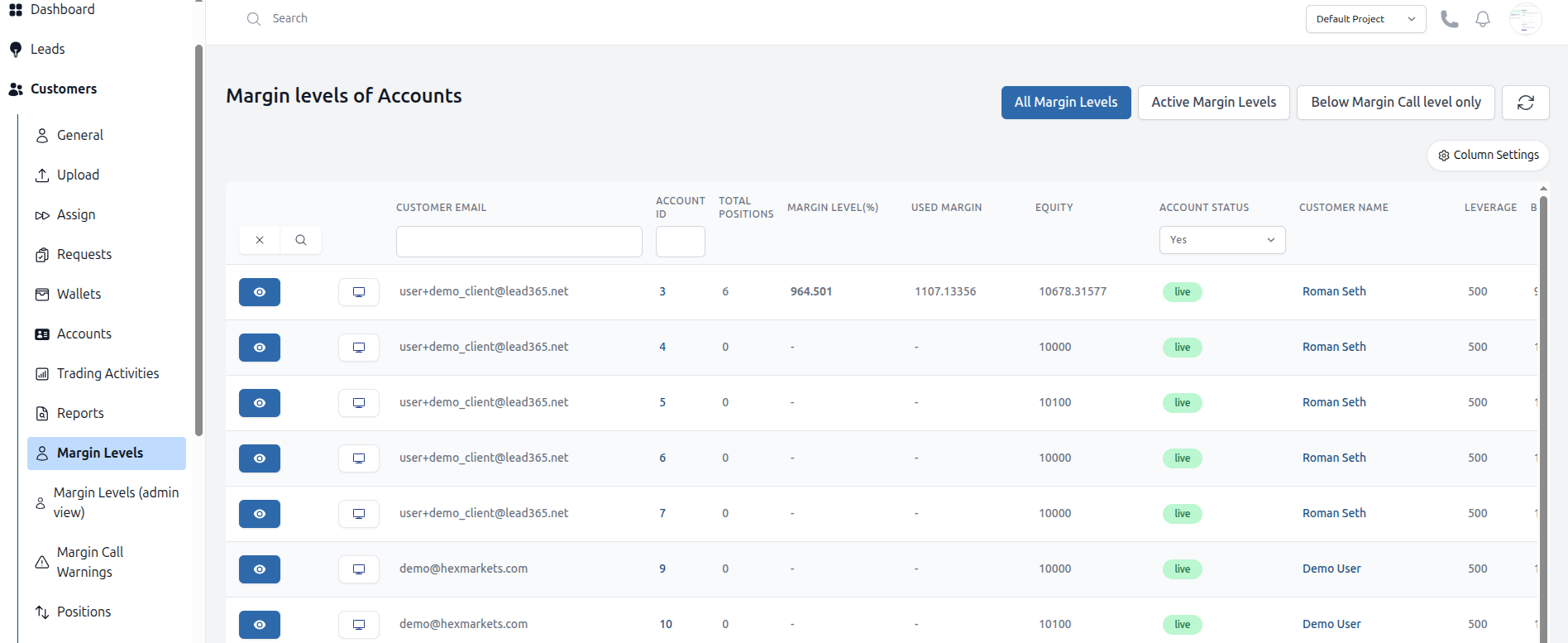
The Margin Levels dashboard provides a real-time overview of all client accounts and their risk status, allowing for proactive management of potential margin calls.
Understanding the Margin Levels View
- Navigate to Customers > Margin Levels (admin view).
- The table shows key metrics for each account:
- Account: The customer and account ID.
- Balance: The current account equity.
- Used Margin: The used margin for open positions.
- Equity: The total current value, including your balance, bonus and any unrealized P&L from open positions..
- Margin Level: The critical ratio, calculated as
(Equity / Used Margin) * 100%.
Using Filters for Proactive Management
The main function of this page is to quickly identify accounts at risk.
-
Filter for "Below Margin Call Level": This filter shows all accounts where the Margin Level is below the system's threshold (e.g., 100%). These accounts are in immediate danger of a margin call.
-
Filter for "Active Margin Levels": This shows all accounts with open positions, sorted by their Margin Level. This helps you monitor overall client risk exposure.
Required Actions
- Accounts Below Margin Call: Closely monitor these accounts. The system may automatically begin closing positions. Consider contacting the client.
- Accounts with Low Margin (e.g., < 200%): These accounts are at high risk if the market moves against them. It is good practice to keep an eye on them.