Manage Customer Bank Information
Applies to: Finance Managers, Compliance Officers
This section allows you to manage and verify banking information submitted by customers for withdrawal processing.
Accessing Bank Information
- Navigate to the customer's profile through Customers > List of all customers
- Select a specific customer
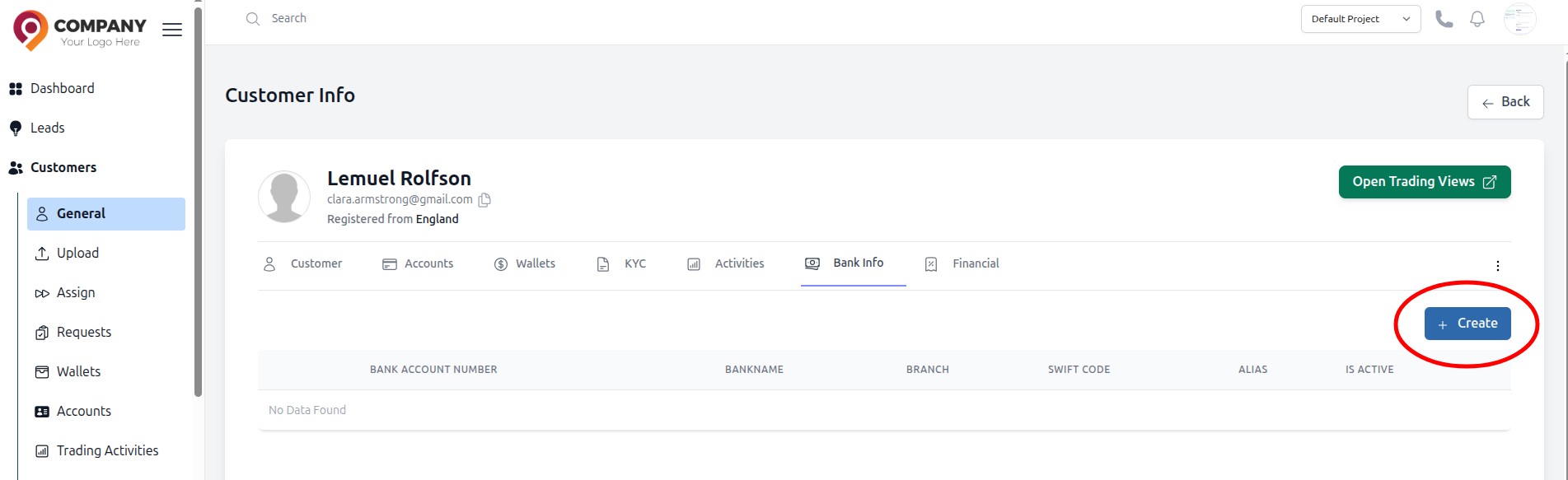
- Look for a Bank Info tab in their profile
Verifying Bank Details
When a customer adds bank information:
- Review the Details: Check account holder name matches customer name
- Verify the Swift Code Validate format and check against bank databases if available
Create Bank Information
When a customer doesn't add bank info
- Click the Create in the bank info page.
- Fill the Create Bank Info form
- Click the Submit, bank info details will be shown in both client portal and CRM
Security Considerations
- Bank details are sensitive PII (Personally Identifiable Information)
- Ensure proper access controls - only authorized finance staff should view this information
- Implement audit logging for all access to bank information
Bulk Bank Info Management
For multiple verifications:
- Use export functionality to download all pending bank info verifications
- Process in batches
- Use bulk update features to mark multiple records as verified