Account Balance Correction Insights
Applies to: Finance Managers, Administrators
This report highlights accounts where system-recorded balances may need manual investigation and adjustment due to discrepancies.
When is a Correction Needed?
Corrections are rare but may be required after:
- A technical error in trade execution or swap/commission calculation.
- A manual intervention to resolve a client dispute.
- A reconciliation process that identifies a mismatch.
Using the Insights Report
-
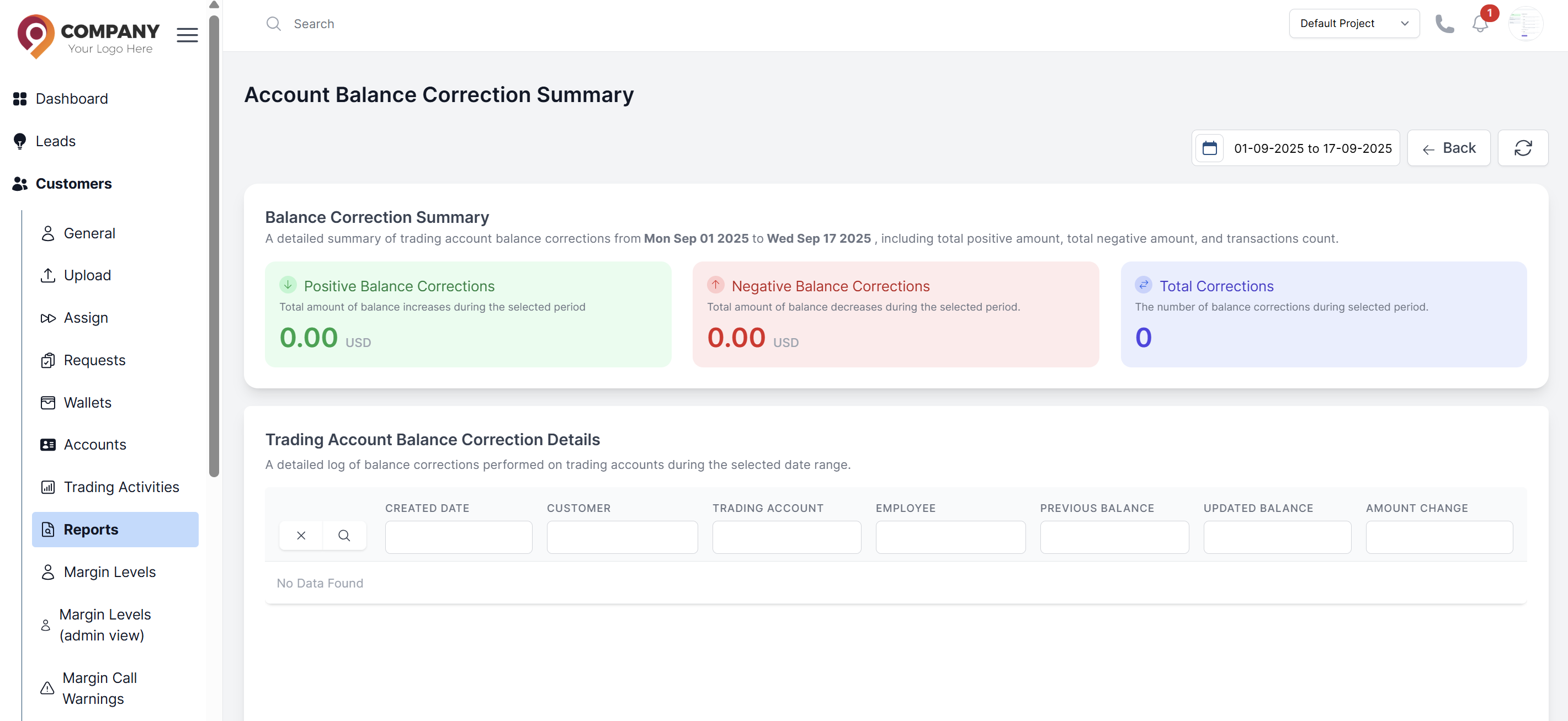
Navigate to Customers > Reports > Account Balance Correction Insights.
-
Set Date Range: Use the date picker in the top right to select your desired reporting period.
-
Review Summary Cards: The report displays three key metrics:
- Positive Balance Corrections: Total amount of balance increases during the selected period
- Negative Balance Corrections: Total amount of balance decreases during the selected period
- Total Corrections: The number of balance corrections performed during the selected period
Analyze Detailed Corrections: The "Trading Account Balance Correction Details" table provides a comprehensive log showing:
- Created Date: When the balance correction was performed
- Customer: Which customer's account was affected
- Trading Account: The specific trading account that was corrected
- Employee: Staff member who performed the correction
- Previous Balance: Account balance before the correction
- Updated Balance: Account balance after the correction
- Amount Change: The exact amount of the correction (positive or negative)
Processing a Correction
If a discrepancy is confirmed:
- Use the Edit Account function
- See the Update trading Account
- Confirm the correction
- Click Update to execute the correction