Edit Account Settings
Applies to: Administrators, Account Managers, Finance Team
The Edit Account section provides comprehensive control over account configuration, including balance adjustments, permission changes, and account property modifications.
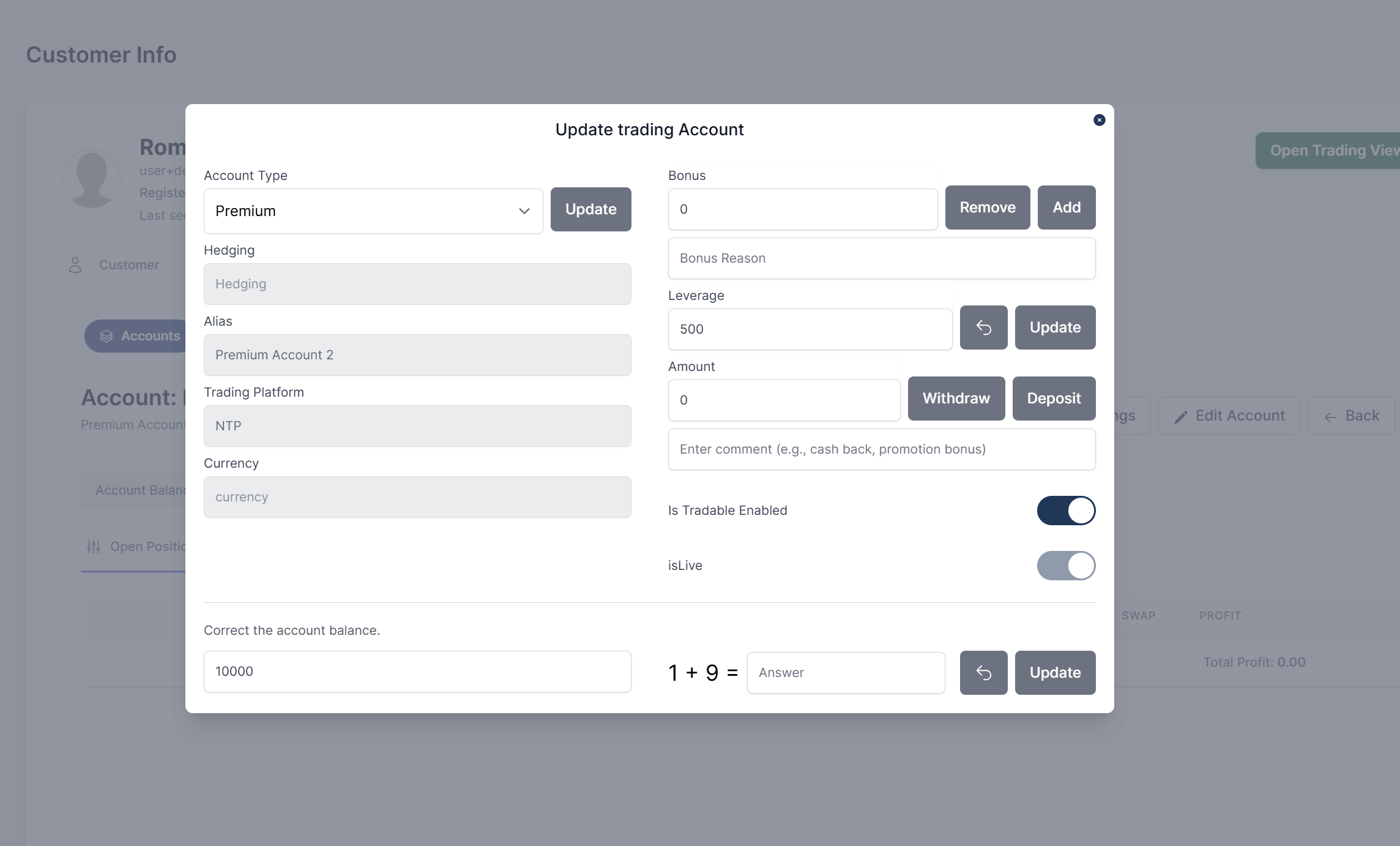
Accessing Edit Account
- Navigate to Customers → Accounts
- Select the desired account and click the action button
- In the Account Details view, click the Edit Account tab
Account Properties Modification
Basic Information
- Account Type: Change account classification
- Leverage: Adjust leverage ratio
- Is Tradable: Enable/disable trading capability
Balance Management
Add Bonus
- Navigate to Bonus input field
- Enter bonus amount
- Enter bonus reason
- Click Add to add, Click Remove to deduct
Balance Correction
- Navigate to Correct the account balance section
- Enter correction amount
- Click Update after solve the simple math addition
Fund Transfers
- Navigate to Amount input field
- Enter the amount
- Add the comment
- Click Deposit to add the amoout or Click Withdraw to remove the amount
- Account balace will update accordantly