Manage Open Positions
Applies to: Administrators, Risk Managers, Trading Support
The Open Positions section allows you to monitor and manage all currently open positions for a specific trading account.
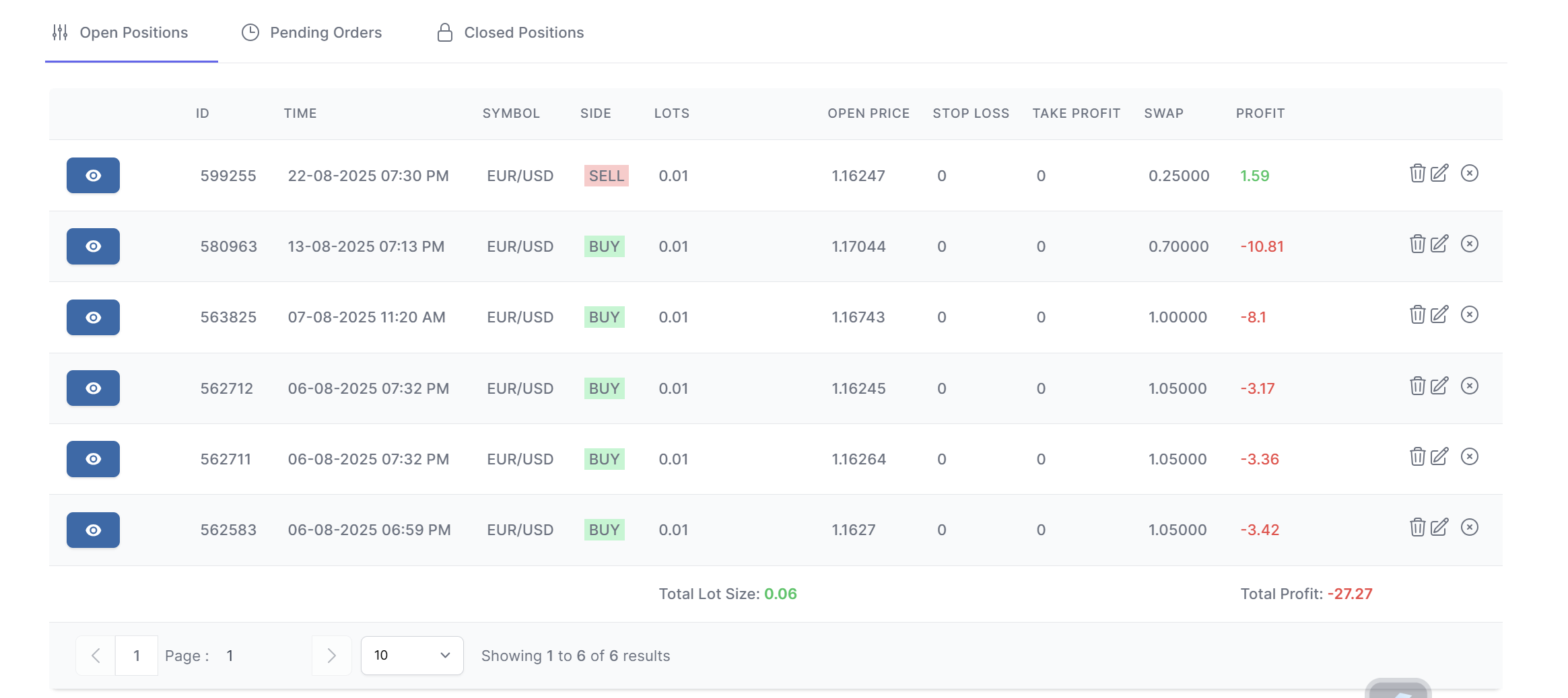
Accessing Open Positions
- Navigate to Customers → Accounts
- Select the desired account and click the action button
- In the Account Details view, ensure the Open Positions tab is selected
Understanding the Open Positions Table
The table displays all current open positions with these columns:
- Position ID: Unique identifier for the position
- Symbol: Trading instrument (e.g., EURUSD, XAUUSD)
- Type: Trade direction (Buy/Sell)
- Volume: Trade size in lots
- Open Price: Entry price
- Current Price: Real-time market price
- Profit/Loss: Current P/L amount
- Open Time: When position was opened
Position Management Actions
Close Position
- Click the Close button for the desired position
- Select the close reason
- Enter verification value
- Click Close Position
- Position will be closed at current market price
Modify Position
- Click the Edit button
- Adjust parameters
- Click Update Position
- Modification will be executed immediately
Delete Position
- Click the Delete button
- Confirm deletion action
- Position will be removed from the account
Real-time Monitoring
The open positions view provides:
- Live Price Updates: Real-time market price changes
- Auto-refresh: Automatic updates every few seconds
- Color Coding: Visual indicators for profit (green) and loss (red)
Advanced Features
Swap Calculation
- View detailed swap calculations
- Monitor swap charges in real-time
- Understand swap rates for different instruments