Manage Pending Orders
Applies to: Administrators, Trading Support
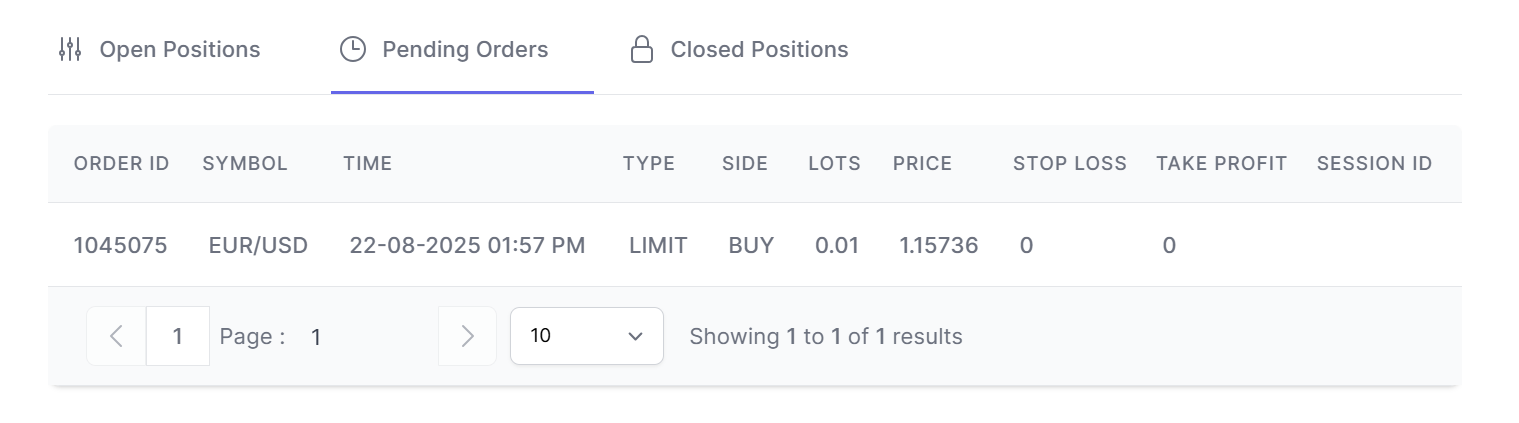
Pending Orders are instructions to open positions when specific market conditions are met. This section allows you to monitor and manage all pending orders for a selected account.
Accessing Pending Orders
- Navigate to Customers → Accounts
- Select the desired account and click the action button
- In the Account Details view, click the Pending Orders tab
Understanding Pending Orders Table
The table displays all pending orders with these columns:
- Order ID: Unique identifier
- Symbol: Trading instrument
- Order Type: Buy Limit, Sell Limit, Buy Stop, Sell Stop
- Volume: Order size in lots
- Order Price: Trigger price for execution
- Stop Loss: Planned stop loss price
- Take Profit: Planned take profit price
- Created: When order was placed
Order Types Explained
Buy Limit
- Opens buy position when price falls TO specified level
- Used for buying at support levels
Sell Limit
- Opens sell position when price rises TO specified level
- Used for selling at resistance levels
Buy Stop
- Opens buy position when price rises TO specified level
- Used for breakout trading
Sell Stop
- Opens sell position when price falls TO specified level
- Used for breakdown trading