Create a Withdrawal
Applies to: Finance Managers, Administrators
Use this function to manually process a withdrawal request on behalf of a customer when needed.
Steps to Create a Withdrawal
-
Navigate to Finance > Withdrawals.
-
Click the Create button.
-
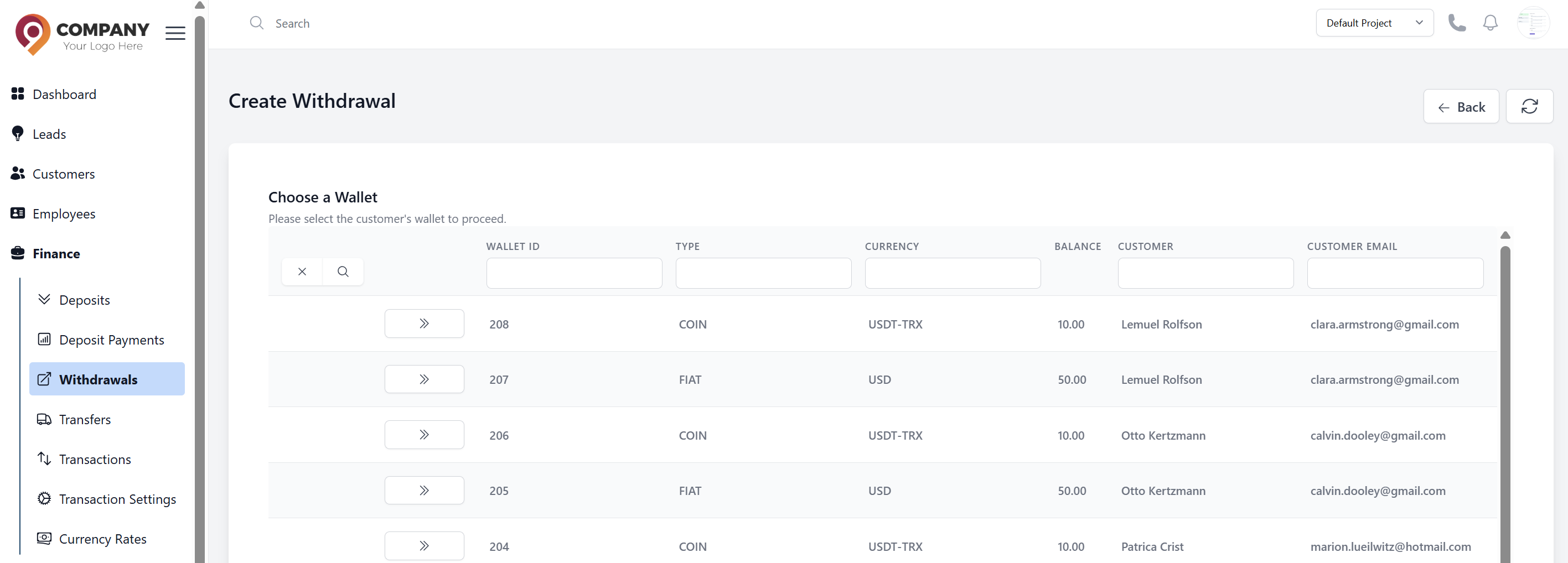
Select the Customer: with the desired Wallet from the table and click the action button.
-
Fill in the withdrawal details:
- Withdrawal Method: Select the withdrawal method.
- Amount: Enter the withdrawal amount.
- Currency: Select the currency (usually auto-filled based on wallet).
- Internal Comment: Add an optional reference note for internal tracking.
-
Click Submit to create the withdrawal request.
Important Notes
- Withdrawals may require manual approval depending on system settings.
- Ensure the customer has sufficient balance in the selected wallet.
- Verify the payment method details are correct before submitting.
- Withdrawal fees may be applied based on the payment method selected.
- The transaction will appear in the customer's transaction history immediately.
Status Tracking
After creation, you can track the withdrawal status:
- Pending: Waiting for approval or processing
- Completed: Successfully processed
- Rejected: Cancelled or failed