Cron Job Configurations
Applies to: System Administrators, DevOps
Cron Jobs are scheduled tasks that handle critical backend processes like calculating swaps, closing margin calls, and generating reports.
Viewing and Editing Cron Jobs
-
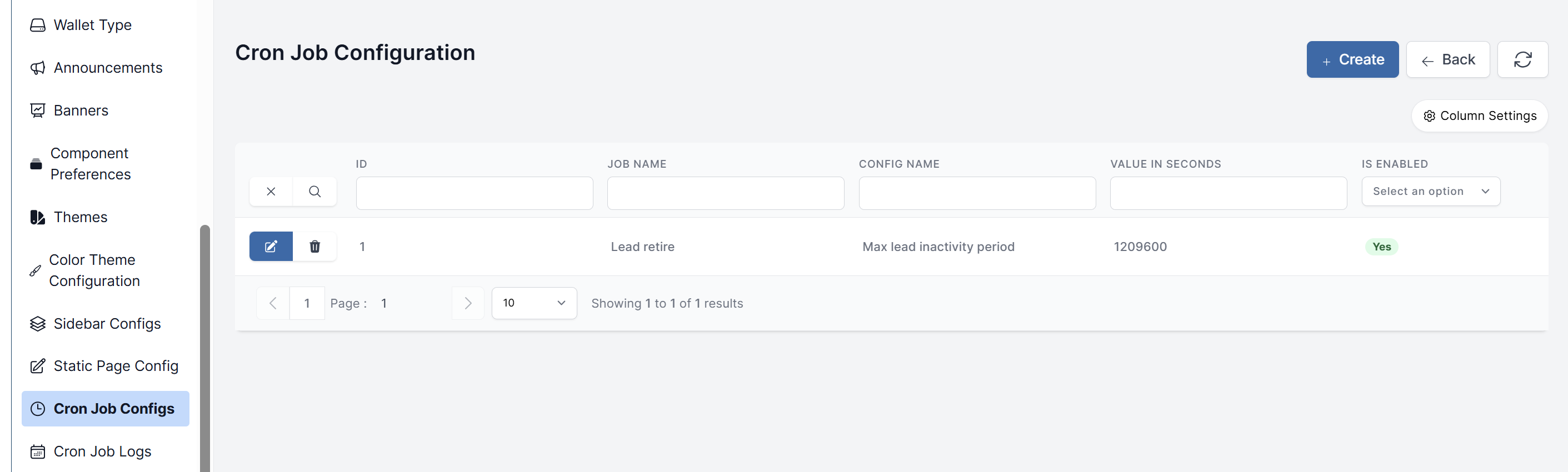
Navigate to Product Settings > Cron Job Configs.
-
You will see a list of all configured cron jobs with the following information:
- ID: Unique identifier for each cron job
- Job Name: Descriptive name of the automated task (e.g., "Lead retire")
- Config Name: Configuration parameter name
- Value in Seconds: The time interval or duration setting for the job
- Is Enabled: Current activation status of the job (Yes/No)
-
Use the Create button to add new cron job configurations.
-
Edit existing jobs by clicking on individual entries to modify their settings and enable/disable status.
Monitoring Cron Job Logs
- Navigate to Product Settings > Cron Job Logs. Cron job logs
- This page shows the execution history of each job.
- Use it to:
- Verify Execution: Check if a job ran successfully.
- Troubleshoot Errors: If a job fails, the log often contains error messages.
- Monitor Performance: See how long each job took to execute.